All features
AI website monitoring

AI website monitoring you can talk to

Connect Spot Downtime to Claude, Cursor, VS Code or any MCP assistant and ask about your sites in plain language: what's down, why the API failed last night, how this week compares with last. It can set up monitors, schedule maintenance and draft status updates too, with your approval. Inside the app, Ask AI on the Monitors page suggests monitors for your site, and when one goes down it reads the checks and tells you why and how to fix it.

Answers from your real data

The assistant reads your monitors, incidents, check history and response times, so its answers come from what actually happened, not guesses.

The busywork, with your OK

Create monitors, schedule maintenance during a deploy or post an incident update by asking. The assistant shows what it will change and waits for a yes.

Alerts never depend on AI

Outages are decided by checks confirmed from California, Amsterdam and Singapore. If the assistant is offline or wrong, your alerts still fire exactly as before.

See it in Spot Downtime

The real app, with a demo team's monitors. Included on every plan, Free too.

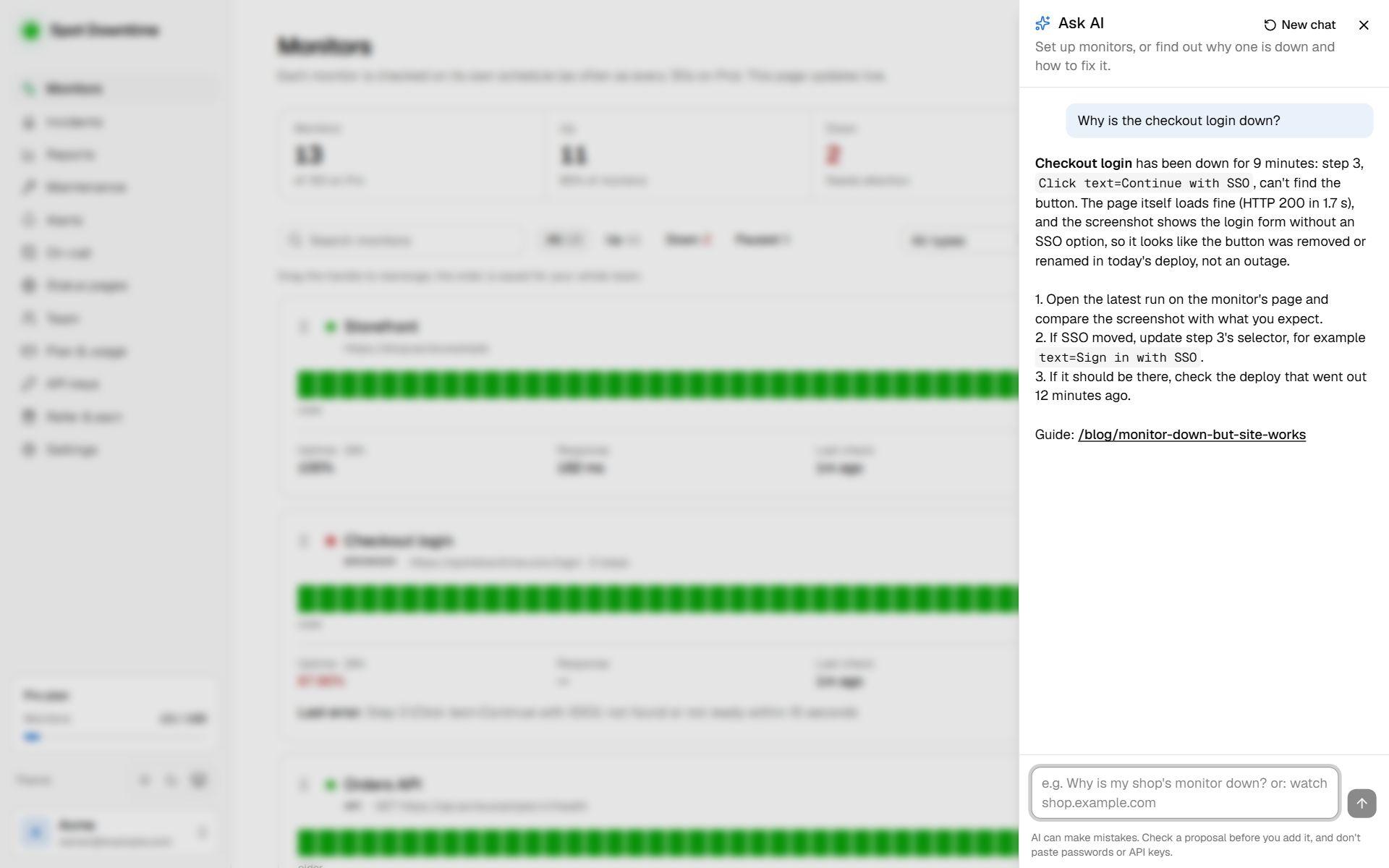
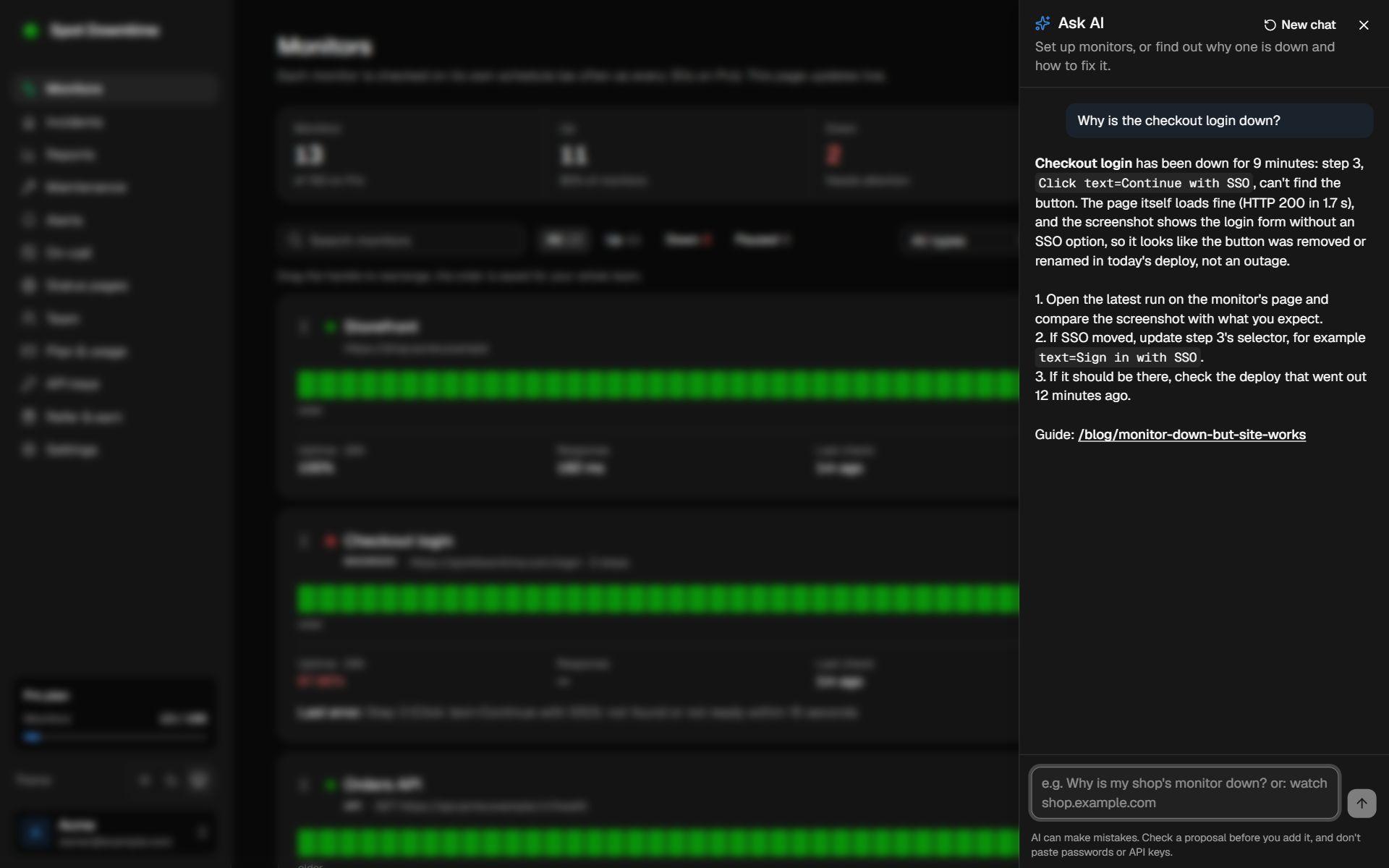
Ask AI explaining why a browser check failed and how to fix it
Ask AI reading a failed check and explaining the cause and the fix.

What is AI website monitoring?

The term covers two different jobs: noticing that a site is down, and understanding and acting on it once it is. Spot Downtime keeps the first job with plain, predictable checks, and brings AI to the second, where it saves the most time.

Your monitors run exactly as before: a status code, a keyword or a JSON assertion, confirmed from three regions. An AI assistant connected over MCP, the open standard assistants use to reach other apps, can then read the results and work with them on your behalf.

What you can ask

Triage in one sentence: “Is anything down right now, and is it one region or all of them?” or “Did anything else fail around the same time as the checkout API?” The assistant reads your monitors and incidents and answers with the error each one returned.

Look back without building a report: “How has the API's response time looked this week compared with last month?” or “Which monitors had the most incidents in October?” Response times and failures go back up to two years.

Hand off the busywork: “Monitor these five URLs every minute and check the pricing page says Start free”, “Put the API in maintenance for 20 minutes while we deploy”, or “Post an update: we've found the cause and a fix is rolling out.” In Claude Code, scheduling maintenance can be part of the deploy itself, so a planned restart never pages anyone.

Why checks, not AI, decide what's down

When an alert wakes someone at 3am, they need to trust it and understand it at a glance. A fixed check gives the same answer for the same failure every time, and says why: “keyword ‘Add to cart’ not found” points straight at the problem in a way a model's confidence score can't.

Most false alarms come from network blips, not from rules being too simple. Spot Downtime retries every failed check and confirms it from California, Amsterdam and Singapore before anything counts as down. That keeps alerts rare and real without handing the decision to a model.

Safe by design

Start read-only: asking questions never needs write access. Choose read & write when you want the assistant to create monitors or post updates, and it shows each change and waits for your approval before making it.

A connection reaches one workspace and never billing, team members or account settings. Every connected assistant is listed under Settings → API keys → Connected apps, and workspace owners and admins can disconnect any of them in a click.

Monitor the AI your product depends on

If your product calls OpenAI, Anthropic or Cohere, an outage there breaks your features while your own site stays up. Third-party monitoring watches their official status pages and alerts you through the same channels as your own monitors, so you know the cause before you dig through your own code.

For your own AI features, add an API monitor on the endpoint that calls the model, with a tiny prompt and assertions that the answer exists and isn't empty. It catches rate limits, expired keys and empty responses that a provider's status page never will.

How to set it up

  1. 1In Claude, open Settings → Connectors and find Spot Downtime in the directory. In another assistant, add the server URL https://spotdowntime.com/api/v1/mcp.
  2. 2Sign in to Spot Downtime and choose the workspace.
  3. 3Pick read-only, or read & write if the assistant may make changes.
  4. 4Ask a question, like “Is anything down right now?”

The details

Works with
Claude on the web, desktop and mobile, Claude Code, Cursor, GitHub Copilot in VS Code, and any MCP client
Connect
Sign in (OAuth 2.1), or an API key. Claude needs no key
Access
Read-only, or read & write. One workspace; never billing, team or account settings
It can read
Monitors, check history, response times up to 2 years back, incidents, maintenance, status pages and alert channels
It can change
Create, edit, pause, resume and delete monitors, run a check now, post incident updates, schedule and end maintenance
Rate limit
120 requests a minute per connection
Server URL
https://spotdowntime.com/api/v1/mcp
In the app
Ask AI on the Monitors page: it proposes monitors you add with one click, and troubleshoots any monitor from its errors, checks, incidents and server reports
Plan
All plans, including Free

Questions

Does AI decide when my site is down?
No. Every monitor runs a fixed check: the status code, keyword or JSON assertion you set, confirmed from three regions before it counts as down. The assistant only reads those results and helps you act on them, so alerts are as predictable as they've always been.
Can the assistant change things without asking?
Not unless you let it. Read-only access can't change anything. With read & write access, Claude shows each change and waits for your approval by default, and you can adjust that per tool in Claude's connector settings. Every connection is listed under Settings → API keys → Connected apps, where you can disconnect it at once.
Which AI assistants can I use?
Claude connects from its connectors directory by signing in. Cursor, GitHub Copilot in VS Code and other MCP clients connect with the server URL and either a sign-in or an API key. The MCP setup guide in the docs has the steps for each.
Is there an assistant inside Spot Downtime itself?
Yes. Click Ask AI on the Monitors page and describe your site, app or servers. It looks at your plan and existing monitors, finds the services your site runs on, tests the addresses, and proposes monitors as cards. Nothing is added until you click Add, and you can open any proposal in the form to change it first.
Can it tell me why a monitor is down?
Yes. Ask Ask AI why a monitor is down, slow or not updating. It reads the monitor's last error, recent checks from each region and incidents, and for servers what the agent last reported, including Docker containers. It can run the check again, then explains the cause and the fix step by step, with a link to the matching guide. It only reads: it never changes a monitor, and secrets like header values and API keys are never sent to the AI.
Can you monitor the AI APIs my product depends on?
Yes. LLM API monitoring sends a tiny prompt to OpenAI, Anthropic, Gemini or your own model with your key and checks the reply, third-party monitoring watches the providers' status pages, and an API monitor can call your own AI endpoint. All three are on every plan.
Does it cost extra?
No. The connector is included on every Spot Downtime plan, Free too. On Claude Team and Enterprise, an owner enables the connector for the organization first.

Set up AI website monitoring in under a minute

Included on the Free plan. No card needed.

Create a free account